Machine Learning Focus
A Comprehensive Course to Master Machine Learning and AI
Logistic Regression in Python
Logistic regression for classification is one of the most common supervised machine learning algorithms that is used to classify a binary variable into two classes. For example, we can use logistic regression to classify patients as diabetic / non- diabetic or having / not having heart disease using some features or predictors. As another example, we can use logistic regression to classify emails as spam or not spam. In this module, we learn how to perform logistic regression for classification in Python.
Introduction to Logistic Regression Classifier
A common task in machine learning is to classify response or target data into two classes using some predictors or features. For instance, the data may include binary values such as success or failure, spam or not spam, having or not having heart disease. When the outcome has two possible values, we call it a dichotomous or binary target variable.
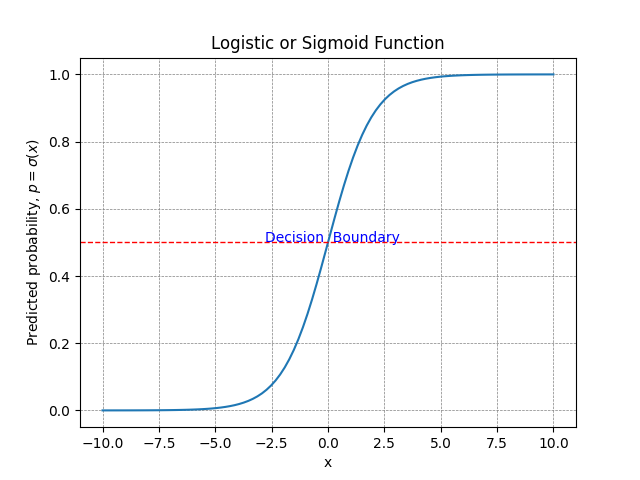
If our outcome variable is binary or categorical, standard linear regression is no longer appropriate because it can produce predictions outside the range because linear regression assumes that the target variable is continuous (such as blood pressure, BMI, or temperature). In addition, linear regression is used to predict a single value while in classification problems we are interested in predicting either of two classes. Logistic regression models a linear relationship between the predictors and the log-odds of the outcome. The logistic (sigmoid) function transforms the resulting values into probabilities between 0 and 1.
Logistic regression estimates the probability that an observation belongs to one of the classes. Once the probabilities (or scores) are estimated, observations with probabilities above the threshold of 0.5 are assigned to one class (e.g., having diabetes) and observations below the threshold are assigned to the other class. For example, a researcher may want to model how predictors such as blood pressure or blood glucose level relate to whether a participant has developed diabetes. Here, the dependent variable is binary (e.g., diabetes = 1, no diabetes = 0), and logistic regression learns how changes in the predictors affect the probability of diabetes. A classification rule (e.g., predict diabetes if the probability is greater than 0.5) then turns these probabilities into class predictions.
In the following sections, we introduce an example data set and demonstrate how to train a logistic regression model as a binary classification algorithm using Python. In addition, we evaluate how well our model performs on real data using cross-validation.
Logistic Regression Classifier Example
Can we build a reliable logistic regression classifier to model and predict heart disease?

A public health researcher aims to build a machine learning algorithm to classify heart disease status (0 = no heart disease, 1 = having heart disease). If the model is highly accurate and has good performance in classifying a patient as having heart disease, it could be considered as a decision-support tool, subject to further validation and clinical evaluation.
The data set includes the heart disease status (presence of artery diameter narrowing, 1 = presence, 0 = absence) as the binary target or response variable. The features used to model the response include: Age, Gender, Chest pain, Resting SBP, Cholesterol, FSB120, Resting ECG, Maximum heart rate, Exercise induced angina, ST depression induced by exercise relative to rest, Slope of the peak exercise ST segment, Number of major vessels (0-3) colored by fluoroscopy, and Thallium stress test (3 = normal; 6 = fixed defect; 7 = reversable defect). Table 1 shows the data for five patients.
| diameter_narrowing | age | gender | chest_pain | rest_SBP | cholesterol | fasting_blood_sugar_greater_120 | rest_ECG | max_HR | exerc_ind_ang | ST_by_exercise | slope_peak_exc_ST | major_vessels_colored | thal |
|---|---|---|---|---|---|---|---|---|---|---|---|---|---|
| 1 | 43 | male | asymptomatic | 132 | 247 | 1 | left vent hypertrophy | 143 | 1 | 0.1 | flat | — | reversable defect |
| 0 | 52 | male | non-anginal | 138 | 223 | 0 | normal | 169 | 0 | 0 | upsloping | — | normal |
| 0 | 58 | male | atypical ang | 125 | 220 | 0 | normal | 144 | 0 | 0.4 | flat | — | reversable defect |
| 0 | 38 | male | non-anginal | 138 | 175 | 0 | normal | 173 | 0 | 0 | upsloping | — | normal |
| 1 | 67 | male | asymptomatic | 160 | 286 | 0 | left vent hypertrophy | 108 | 1 | 1.5 | flat | 3 | normal |
| … | … | … | … | … | … | … | … | … | … | … | … | … | … |
The complete dataset used in this example can be downloaded in CSV format from this link.
Workflow: Logistic Regression in Python
In this example, the binary outcome is the absence or presence of heart diseases (narrowed arteries) in patients. The features (or predictors) include all the variables described above. Our goal is to use machine learning to build a logistic regression model that predicts the probability of a patient having heart disease given the patient level variables. As in any machine learning workflow, the first step is reviewing and preparing the data. We present the required Python code in each step.
Data Preprocessing
Data preprocessing includes steps that prepare the data for the specific machine learning algorithm. Common data preprocessing steps include dummy encoding categorical variables (e.g., gender, chest pain), dropping or imputing missing values, and scaling continuous variables (e.g., age). Listing 1 shows the Python code for loading the data and dropping any missing values.
# Import necessary libraries
import pandas as pd
from sklearn.linear_model import LogisticRegression
from sklearn.model_selection import StratifiedKFold, train_test_split
from sklearn.preprocessing import StandardScaler
from sklearn.metrics import roc_auc_score
from sklearn.model_selection import cross_validate
from sklearn.metrics import roc_curve
from sklearn.metrics import ConfusionMatrixDisplay
from sklearn.metrics import classification_report
from sklearn.compose import ColumnTransformer
from sklearn.pipeline import Pipeline
import matplotlib.pyplot as plt

# Load the dataset
dfHeartDisease = pd.read_csv('df_heart_disease.csv')

# Drop missing values
missingValues = dfHeartDisease.isna().sum()
missingValues = missingValues[missingValues > 0]
if not missingValues.empty:
    print("Missing values before dropping rows:")
    print(missingValues)
    dfHeartDisease.dropna(inplace=True)
After loading the data and dropping the missing values (although imputations method are preferred where possible), we need to apply some transformation to the data to prepare them as input to a machine learning model. The common transformations include converting categorical string values into numbers, dummy encoding categorical variables, and standardizing continuous variables. Listing 2 shows the Python code for data transformations.
# Encode categorical variables
catVars = ["gender","chest_pain", "rest_ECG", "slope_peak_exc_ST", "thal"]
dfHeartDisease = pd.get_dummies(dfHeartDisease, columns=catVars, dtype=int, drop_first=True)
After preprocessing the data, we randomly split data in train and test sets using code in Listing 3.
Fitting the Logistic Regression Model
In the first step, we divide the data into training set and test set. We randomly split the data into an 80% training set and a 20% test set using stratified sampling to preserve class proportions. Listing 3 shows Python code to split the data into training set and test set.
# Define features and target variable
features = dfHeartDisease.drop('diameter_narrowing', axis=1)
target = dfHeartDisease['diameter_narrowing']

# Split into training and testing sets
featuresTrain, featuresTest, targetTrain, targetTest = train_test_split(
    features, target, test_size=0.2, stratify=target, random_state=1977
)


# Scale after training-test split to avoid data leakage
columnsToScale = ['age', 'rest_SBP', 'cholesterol', 'max_HR', 'ST_by_exercise']
scaler = StandardScaler()
featuresTrain[columnsToScale] = scaler.fit_transform(featuresTrain[columnsToScale])
featuresTest[columnsToScale] = scaler.transform(featuresTest[columnsToScale])
Once we have created the training and test sets, we fit (train) the logistic regression model on the training set in order for the machine learning model to learn about the data (through estimating parameters). Listing 4 includes the Python code to fit (train) the logistic regression model on training set.
# Train the logistic regression model
modelLR = LogisticRegression(penalty="l2", solver='liblinear', max_iter=1000)
modelLR.fit(featuresTrain, targetTrain)
Our logistic regression model has now learned about the data through training. Next, we need to test how well it learned about the data on a test data set that we set aside (the 20% subset).
Evaluating the Trained Logistic Regression Model
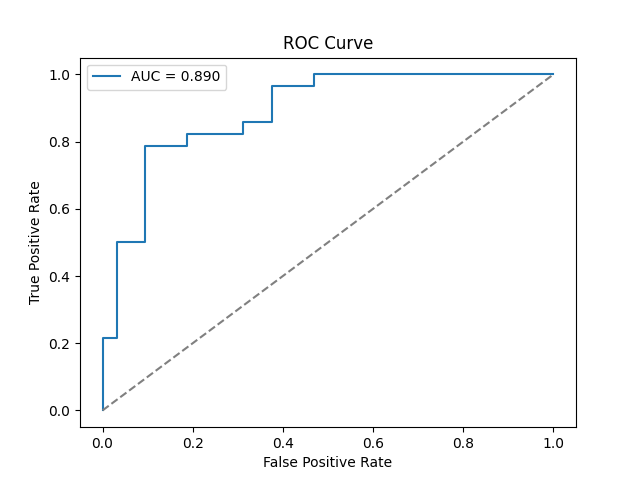
A good model is one that performs well on new data. Therefore, after training our logistic regression classifier on the training set, we use the model to make prediction on new data (the test set). We can then evaluate the performance of our model using metrics such as accuracy, precision, recall, area under receiver operating curve (AUC), and the F1 score. Listing 5 shows the Python code to run the trained model on the test set and obtain performance metrics.
# Evaluate the model
targetPred = modelLR.predict(featuresTest)
targetProb = modelLR.predict_proba(featuresTest)[:, 1]

print("AUC:", roc_auc_score(targetTest, targetProb))
print(classification_report(targetTest,targetPred))
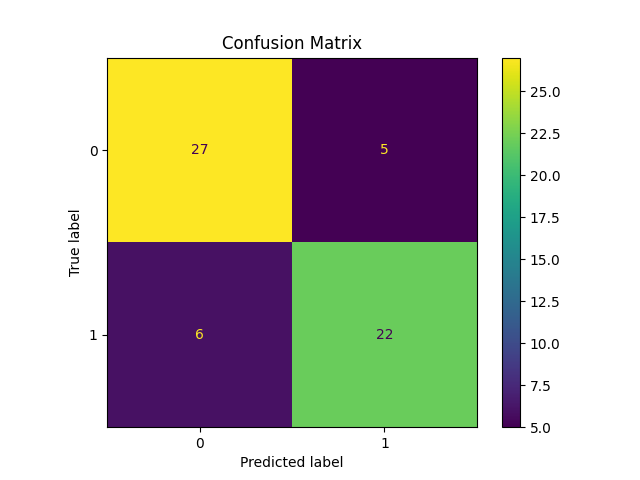
In our analysis, the performance of the logistic regression classifier is very good, with Accuracy: 0.82, AUC: 0.89, Precision: 0.81, Recall: 0.79, and F1 Score: 0.80.
A confusion matrix summarizes the model’s classification results by displaying correct and incorrect predictions for each class. It breaks results into true positives, true negatives, false positives, and false negatives, offering a simple, visual way to see where the model performs well and where misclassifications occur. Listing 6 shows Python code to create a confusion matric. Figure 3 shows the confusion matrix for the logistic regression classifier.
# Plot & Save Confusion Matrix
fig, ax = plt.subplots()
ConfusionMatrixDisplay.from_estimator(modelLR, featuresTest, targetTest, ax=ax)
plt.title('Confusion Matrix')
plt.savefig('confusion_matrix.png')
plt.show()
We can also visualize the ROC curve (Figure 4) using the Python code in Listing 7.
# Plot & Save ROC Curve
plt.figure()
falsePositiveRate, truePositiveRate, _ = roc_curve(targetTest, targetProb)
plt.plot(falsePositiveRate,truePositiveRate,label=f"AUC = {roc_auc_score(targetTest, targetProb):.3f}")
plt.plot([0, 1], [0, 1], '--', color='gray')
plt.xlabel('False Positive Rate')
plt.ylabel('True Positive Rate')
plt.title('ROC Curve')
plt.legend()
plt.savefig('roc_curve.png')
plt.show()
In addition to train-test approach to model evaluation, we can also use stratified k-fold cross-validation. K‑fold cross‑validation divides the dataset into equally sized subsets (folds). For each of the k iterations, one selected fold (subset) is used as the test set, and the remaining folds are combined to form the training set. After cycling through all folds, the performance metrics are averaged across the iterations to obtain a more stable estimate of model performance. In k-fold cross-validation, scaling is performed within each training fold through the pipeline to prevent information leakage from validation folds. The Python code in Listing 7 shows how to evaluate model performance using k-fold cross-validation.
# Stratified k-fold cross-validation
# Cross-Validation setup using Pipeline to avoid cross-fold leakage

columnsToScale = ['age', 'rest_SBP', 'cholesterol', 'max_HR', 'ST_by_exercise']
preProcessor = ColumnTransformer(
    transformers=[("scale", StandardScaler(), columnsToScale),],
    remainder="passthrough",
)

cvPipeline = Pipeline([
        ("preprocessor", preProcessor),
        ("classifier", LogisticRegression(penalty="l2", solver="liblinear", max_iter=1000)),])

cv = StratifiedKFold(n_splits=5, shuffle=True, random_state=1977)
scores = cross_validate(
    cvPipeline,
    features,
    target,
    cv=cv,
    scoring=["accuracy", "precision", "recall", "f1", "roc_auc"],
)

print("\n--- 5-Fold Stratified CV Results ---")
print("Cross-val accuracy:", scores["test_accuracy"].mean())
print("Cross-val precision:", scores["test_precision"].mean())
print("Cross-val recall:", scores["test_recall"].mean())
print("Cross-val f1:", scores["test_f1"].mean())
print("Cross-val auc:", scores["test_roc_auc"].mean())
Using the k-fold cross-validation method, the model performance metrics include Accuracy: 0.85, precision = 0.87, recall = 0.80, F1 Score: 0.83, and AUC: 0.90, which are a bit different than the train-test method but typically more stable estimates of out-of-sample performance.
Conclusion and Key Takeaways
In this tutorial, we learned how to build and evaluate a machine learning classifier using logistic regression for predicting heart disease. Our workflow consisted of preprocessing the data, training the model, and assessing the model performance using multiple metrics and cross-validation. The results show that our logistic regression classifier provides a strong model for classification of heart conditions.
Next Steps
In the next steps, we can experiment with our model through changing the regularization parameters or comparing the performance of logistic regression with other supervised machine learning models, such as random forest, gradient boosting, or support vector machine (SVM) classifiers.